




WordPress Website Redesign Services: Full Process Explained
Your WordPress site isn’t “just a website.” It’s your first impression, your salesperson, and your conversion engine all rolled into one. And if it’s slow, outdated, or confusing… it’s quietly turning visitors into exits. The worst part? You might not even notice it happening.
A smart WordPress redesign doesn’t just make things look pretty (though yes, that helps). It fixes what’s broken, sharpens your user experience, and turns casual clicks into real results. This guide breaks down exactly how a professional redesign works, what it costs, and how to make sure you don’t burn money on a surface-level upgrade that solves nothing.
Do You Really Need a WordPress Website Redesign?
Your WordPress site might look fine to you. But your visitors and Google may be telling a very different story.
Here’s the hard truth: 94% of first impressions are design-related. If your site feels outdated, loads slowly, or confuses users, they leave. And they don’t come back.
A WordPress site redesign isn’t just a cosmetic upgrade. It’s a strategic business decision that directly impacts your traffic, leads, and revenue
7 signs it’s time to redesign your WordPress website:
- Your site looks noticeably older than your competitors’
- It isn’t fully mobile-responsive website (over 60% of web traffic now comes from mobile devices)
- Pages load slowly anything above 3 seconds costs you conversions
- Your bounce rate is high and conversions are low
- You’ve rebranded or shifted your business focus
- Your WordPress version, theme, or plugins are outdated and creating security risks
- You’re struggling to rank despite having solid content
If you checked two or more of those boxes, a WordPress site redesign isn’t optional it’s overdue.
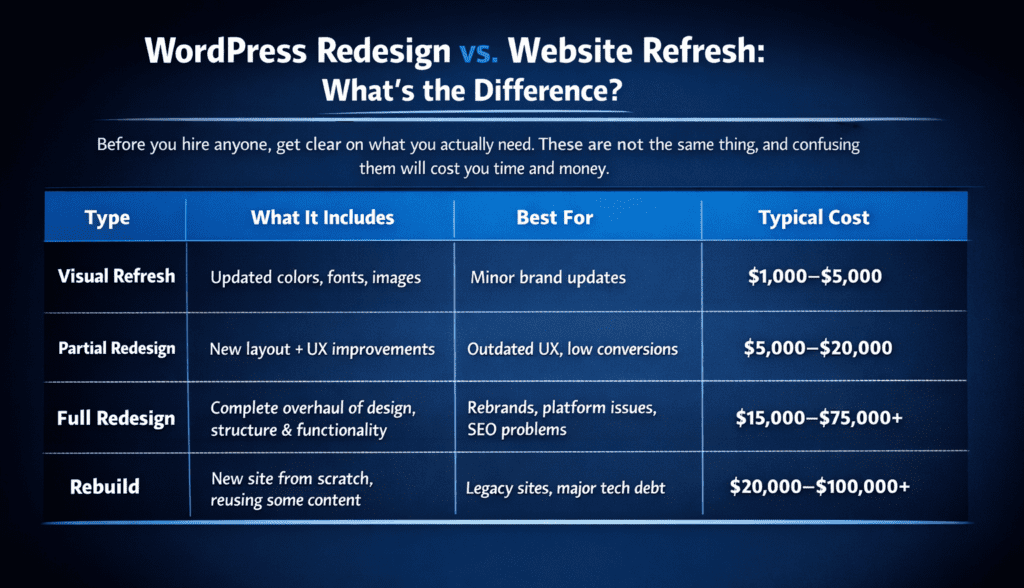
Pro tip: Most businesses that think they need a “refresh” actually need a full redesign. A superficial update won’t fix deep UX or SEO problems, it just delays them.
The Complete WordPress Redesign Process: 7 Steps Explained
Professional WordPress website redesign services follow a structured process. Here’s exactly what that looks like week by week.
Step 1: Discovery & Audit (Weeks 1–2)
This is where the real work begins before a single pixel is touched.
A thorough discovery phase includes:
- Performance, security, SEO health, plugin conflicts
- What are your top 3 competitors doing better?
- Heatmaps, session recordings, funnel drop-offs
- Aligning business goals with design decisions
- What does success look like? (More leads? Better rankings? Higher conversions?)
Why this matters: Skipping the audit is like renovating a house without checking the foundation. You’ll fix the wrong things and break what was already working.
Step 2: Strategy & Planning (Weeks 2–3)
With audit data in hand, your agency builds the blueprint for the redesign.
This phase covers:
- Restructuring your site’s navigation and page hierarchy
- Low-fidelity layouts that map the user journey before design begins
- Documenting every existing URL and mapping 301 redirects
- Deciding what to keep, update, consolidate, or remove
- So everyone is aligned before development starts
This is the phase most agencies rush and where most redesigns go wrong. A proper SEO migration plan at this stage is what protects your organic rankings through the transition.
Step 3: Design & Development (Weeks 4–8)
This is the longest and most resource-intensive phase of any WordPress redesign service.
Design side:
- Visual mockups and prototypes (desktop + mobile)
- Typography, color system, imagery style
- Reducing friction, improving conversion paths
- Client review and approval rounds
Development side:
- Custom WordPress theme development (or advanced theme customization)
- CRM, payment gateways, booking systems, marketing tools
- Responsive design implementation across all screen sizes
- Caching, image compression, code minification
- SSL, firewall, malware scanning setup
Custom theme development vs. theme customization: Custom is more expensive but gives you full control and better long-term performance. Pre-built themes are faster and cheaper but come with bloat and limitations. Your agency should help you choose based on your goals and budget.
Step 4: Content Migration & SEO Setup (Weeks 8–10)
This is the phase that separates agencies that know WordPress from agencies that don’t.
Content migration includes:
- Full content audit identifying what to migrate, update, or cut
- Database migration using tools like All-in-One WP Migration or WP Migrate DB
- Rewriting and optimizing key pages for target keywords
- Preserving existing meta titles and descriptions for high-ranking pages
SEO setup includes:
- 301 redirect mapping every changed URL must redirect correctly
- XML sitemap generation and submission to Google Search Console
- Schema markup implementation (Article, FAQ, BreadcrumbList)
- Internal linking structure review and optimization
- Core Web Vitals baseline measurement
The stakes here are real.*Poor redirect handling during a WordPress migration can cause an immediate and dramatic drop in organic traffic sometimes overnight. This is not a phase to cut corners on.
Step 5: Testing & QA (Weeks 10–11)
Nothing ships without rigorous testing. A professional WordPress redesign agency will run:
- Cross-browser testing, Chrome, Firefox, Safari, Edge
- Mobile responsiveness testing across multiple device sizes
- Performance testing Google PageSpeed Insights, GTmetrix, Core Web Vitals
- Vulnerability scans, login protection, firewall checks
- Forms, checkout flows, integrations, CTAs
- Real users testing real tasks before launch
A single broken contact form or a checkout bug that slips through QA can cost you real revenue. Don’t rush this phase.
Step 6: Launch & Deployment (Week 12)
Launch day is not the finish line, it’s the starting gun.
Pre-launch checklist:
- Staging environment final review
- DNS and hosting configuration
- Cache clearing across all layers
- Analytics and Search Console verification
- 301 redirects live and tested
- Rollback plan confirmed (in case anything breaks)
Post-launch (first 48 hours):
- Monitor Google Search Console for crawl errors
- Check all redirects are resolving correctly
- Verify no pages are accidentally set to noindex
- Confirm analytics is tracking correctly
- Test all forms, CTAs, and conversion paths
Step 7: Post-Launch Monitoring & Optimization (Ongoing)
A redesign is not a one-time project it’s the beginning of an ongoing optimization cycle.
What good post-launch monitoring looks like:
- Weekly Google Search Console checks for indexing issues and ranking changes
- Traffic, conversions, bounce rate, session duration
- Catching performance regressions early
- Surveys, heatmaps, session recordings
- Headlines, CTAs, layouts
- Plugin updates, security patches, backups
How Much Does a WordPress Website Redesign Cost in 2025?
Let’s talk numbers. WordPress website redesign costs vary widely and for good reason. The scope, complexity, and team you hire all drive the final price.
Cost by what you want:
| Project Type | Typical Cost Range | Timeline |
| Visual Refresh | $1,000–$5,000 | 2–4 weeks |
| Small Business Redesign | $5,000–$20,000 | 6–10 weeks |
| Mid-Size Business Redesign | $15,000–$40,000 | 10–16 weeks |
| Ecommerce Redesign | $20,000–$75,000 | 12–20 weeks |
| Enterprise Redesign | $75,000–$300,000+ | 6–12 months |
Cost by who you hire:
| Provider Type | Cost Range | Best For |
| Freelancer | $2,500–$10,000 | Simple sites, tight budgets |
| Boutique Agency | $10,000–$40,000 | SMBs needing full-service support |
| Full-Service Agency | $25,000–$75,000+ | Complex sites, ecommerce, enterprise |
Important: WordPress redesign costs typically do not include logo redesign, content writing, or ongoing maintenance. Always clarify what’s in scope before signing a contract.
What drives the cost up?
- Number of pages and templates required
- Custom functionality (booking systems, membership portals, API integrations)
- Ecommerce complexity (WooCommerce setup, payment gateways, product catalog size)
- Volume of content to migrate and optimize
- SEO migration complexity (number of URLs, redirect mapping)
- Third-party integrations (CRM, ERP, marketing automation)
- Timeline urgency (rush projects cost more)
The bottom line on pricing: A cheap WordPress redesign can cost you far more in the long run through poor performance, security vulnerabilities, or the need for a complete rebuild within 12 months. Treat your redesign as a capital investment, not a marketing expense.
How Long Does a WordPress Redesign Take?
| Site Size | Typical Timeline |
| Small site (under 20 pages) | 6–10 weeks |
| Medium site (20–50 pages) | 10–16 weeks |
| Large site (50–100+ pages) | 16–24 weeks |
| Enterprise / Ecommerce | 6–12 months |
What extends timelines:
- Slow client feedback and approval cycles
- Scope creep (adding features mid-project)
- Complex third-party integrations
- Large content volumes requiring review and optimization
- Multiple stakeholders involved in decision-making
How to Choose a WordPress Redesign Agency: 8 Key Criteria
Not all WordPress redesign services are created equal. Here’s how to evaluate agencies before you commit.
Portfolio & Case Studies: Look for real before-and-after examples not just pretty screenshots. Ask: did the redesign improve traffic, conversions, or revenue?
WordPress-Specific Expertise: WordPress is a specialized platform. Ask about their theme development approach, plugin strategy, and how they handle performance optimization.
SEO Knowledge: This is non-negotiable. Any agency handling your WordPress redesign must have a clear SEO migration process. Ask specifically: “How do you protect my rankings during a redesign?”
Client Testimonials & Reviews: Check Google, Clutch, and UpCity. Look for patterns: do clients mention communication, timelines, and results?
Transparent Pricing: Avoid agencies that won’t give you a detailed scope of work. Hidden costs are a red flag.
Post-Launch Support: What happens after launch? Do they offer a maintenance plan? Who do you call if something breaks?
Communication & Project Management: Ask what tools they use (Asana, Basecamp, Notion) and how often you’ll receive project updates.
Security & Compliance: Do they implement SSL, firewalls, and malware scanning? Do they follow GDPR or ADA compliance requirements if relevant to your business?
Questions to Ask Before Hiring a WordPress Redesign Service:
Before signing anything, ask these directly:
- How will you protect my current SEO rankings during the redesign?
- What’s your 301 redirect strategy?
- Do you build on a staging environment before going live?
- What’s included in your post-launch support?
- How do you handle scope changes mid-project?
- Can you show me examples of redesigns you’ve done for businesses like mine?
- What’s your WordPress security approach?
- Will you provide training so my team can manage the site after launch?
Any agency worth hiring will answer these confidently and in detail. Vague answers are a warning sign.
5 Critical WordPress Redesign Mistakes That Cost You Rankings & Revenue:
Even well-intentioned redesigns go wrong. Here are the five most expensive mistakes and how to avoid them.
Mistake 1: Ignoring SEO Until After Launch:
SEO should be baked into the redesign from day one not bolted on afterward. Changing URLs without proper 301 redirects, losing meta tags, or breaking your internal linking structure can cause an immediate and severe drop in organic traffic. One case study showed a site losing 68% of its search visibility after a poorly managed WordPress migration.
Fix: Require a documented SEO migration plan before the project starts. This includes URL mapping, redirect implementation, and post-launch Search Console monitoring.
Mistake 2: Migrating Old Content Without Reviewing It:
A new design doesn’t fix weak content. Many businesses move outdated, poorly written, or irrelevant pages to their new site without a second thought and then wonder why conversions don’t improve.
Fix: Use the redesign as an opportunity to audit every page. Remove what’s outdated, update what’s valuable, and consolidate thin content.
Mistake 3: Neglecting Mobile Performance:
With over 60% of web traffic coming from mobile devices, a site that doesn’t perform flawlessly on mobile is actively losing business. This isn’t just a UX issue Google’s mobile-first indexing means your mobile performance directly impacts your search rankings.
Fix: Test on real devices, not just browser simulators. Prioritize Core Web Vitals scores on mobile specifically.
Mistake 4: Overloading the Site With Plugins:
It’s tempting to add plugins for every feature. But too many plugins create conflicts, slow down your site, and introduce security vulnerabilities. One poorly coded plugin can break your entire site.
Fix: Keep plugins minimal and purposeful. Every plugin should have a clear reason for existing. Audit and remove unused plugins before and after the redesign.
Mistake 5: Skipping Proper Testing Before Launch
Launching with broken forms, checkout errors, or pages that don’t render correctly on certain browsers is a fast way to lose trust and revenue. Rushing the QA phase to hit a deadline is a false economy.
Fix: Build testing time into the project timeline from the start. Never compress QA to make up for delays elsewhere in the project.
Ready to Redesign Your WordPress Site? Work With Marsmatics
You’ve read the full process. You know what a professional WordPress website redesign service looks like. Now the question is: who do you trust to execute it?
Marsmatics is a specialist web design and development agency that delivers WordPress redesigns built to perform not just look good.
Here’s what working with Marsmatics looks like:
- Full discovery and audit before any design work begins.
- SEO-first approach ensures your rankings are protected throughout the entire process.
- Custom WordPress development with no bloated page builders or cookie-cutter templates.
- Transparent pricing and timelines so you always know where your project stands.
- Post-launch support and maintenance so we don’t disappear after launch day.
Whether you’re a small business ready for your first professional redesign or an established brand looking to rebuild for growth, Marsmatics has the expertise to make it happen. Don’t let an outdated WordPress site cost you another lead.
Get Your Free WordPress Redesign Consultation with Marsmatics
Frequently Asked Questions
How long does a WordPress website redesign take?
A small business WordPress redesign typically takes 6–10 weeks. Mid-size sites take 10–16 weeks. Large or ecommerce sites can take 4–6 months or longer. The biggest factors affecting timeline are client feedback speed, scope complexity, and content volume.
Will a WordPress redesign hurt my SEO rankings?
It can if it’s handled poorly. A professional WordPress redesign service will include a full SEO migration plan: URL mapping, 301 redirects, meta tag preservation, and post-launch monitoring. Done correctly, a redesign should improve your SEO performance, not damage it.
Do I need to redesign my WordPress site or just update my theme?
If your issues are purely visual and your site structure, performance, and SEO are solid, a theme update may be enough. But if you’re experiencing high bounce rates, poor mobile performance, declining rankings, or conversion problems, a full WordPress site redesign is the more effective solution.
How do I choose the right WordPress redesign agency?
Look for an agency with a proven WordPress portfolio, a clear SEO migration process, transparent pricing, and strong post-launch support. Ask specifically how they protect your rankings during the redesign and what their QA process looks like. Avoid agencies that can’t answer these questions clearly.
What should be included in a WordPress redesign service?
A complete WordPress website redesign service should include: site audit, strategy and wireframing, custom design and development, content migration, SEO setup (redirects, sitemap, schema), QA testing, launch support, and post-launch monitoring. If an agency’s proposal is missing any of these, ask why.